官方文档地址
https://www.elastic.co/guide/en/elasticsearch/reference/current/index.html
设置Elasticsearch
安装Elasticsearch
Linux安装Elasticsearch
Linux下,非Docker启动Elasticsearch 6.3.0,安装ik分词器插件,以及使用Kibana测试Elasticsearch
Docker安装Elasticsearch
Linux使用Docker启动Elasticsearch并配合Kibana使用,安装ik分词器
Elasticsearch入门
索引文档
添加文档,请求体是JSON格式
1 | PUT /customer/_doc/1 |
- 这里添加了索引
customer类型_doc文档id1添加文档内容{"name": "John Doe"} - 索引不存在,则自动创建
- 这是新文档,所以文档版本是1
1
2
3
4
5
6
7
8
9
10
11
12
13
14{
"_index" : "customer",
"_type" : "_doc",
"_id" : "1",
"_version" : 1,
"result" : "created",
"_shards" : {
"total" : 2,
"successful" : 1,
"failed" : 0
},
"_seq_no" : 0,
"_primary_term" : 1
}获取文档
结果1
GET /customer/_doc/1
1
2
3
4
5
6
7
8
9
10
11
12{
"_index" : "customer",
"_type" : "_doc",
"_id" : "1",
"_version" : 1,
"_seq_no" : 0,
"_primary_term" : 1,
"found" : true,
"_source" : {
"name" : "John Doe"
}
}批量插入,使用关键字
_bulk索引为bank
把下面三个点换成accounts.json1
2POST /bank/_bulk
...查看插入的数据量
1
GET /_cat/indices?v

开始搜索
按照
account_number进行升序,检索bank索引的全部文档
1 | GET /bank/_search |
默认显示前10个文档hits
1 | { |
took搜索花费时间 单位:毫秒mstimed_out搜索是否超时_shards搜索了多少分片,成功,失败,跳过的分片数max_score找到的最相关的文档的分数hits.total.value匹配多少文档hits.sort文档的排序位置hits._score文档的相关性分数(在使用时不适用match_all)分页查询
fromsize
跳过前5个文档,然后再往下查找十个文档1
2
3
4
5
6
7
8
9GET /bank/_search
{
"query": { "match_all": {} },
"sort": [
{ "account_number": "asc" }
],
"from": 5,
"size": 10
}条件查询
match
默认进行分词 查找有关mill或lane的词
匹配19个1
2
3
4GET /bank/_search
{
"query": { "match": { "address": "mill lane" } }
}短语搜索
match_phrase
查找有关mill lane的短语
匹配1个1
2
3
4GET /bank/_search
{
"query": { "match_phrase": { "address": "mill lane" } }
}多条件查找
boolmust都满足must_not都不满足should满足任何一个
默认按照相关性分数排序
在索引bank中查找age=40 and state!='ID'的文档1
2
3
4
5
6
7
8
9
10
11
12
13GET /bank/_search
{
"query": {
"bool": {
"must": [
{ "match": { "age": "40" } }
],
"must_not": [
{ "match": { "state": "ID" } }
]
}
}
}过滤器
filter
查找20000<=balance<=300001
2
3
4
5
6
7
8
9
10
11
12
13
14
15
16GET /bank/_search
{
"query": {
"bool": {
"must": { "match_all": {} },
"filter": {
"range": {
"balance": {
"gte": 20000,
"lte": 30000
}
}
}
}
}
}
使用聚合分析结果
terms分组,聚合名称group_by_state
对字段state进行分组,降序返回账户最多的10种
1 | GET /bank/_search |
结果
- size=0所以hits不显示内容
- 聚合默认是前10条,默认按照分组文档数量降序
1
2
3
4
5
6
7
8
9
10
11
12
13
14
15
16
17
18
19
20
21
22
23
24
25
26
27
28
29
30
31
32
33
34
35
36
37
38
39
40
41
42
43
44
45
46
47
48
49
50
51
52
53
54
55
56
57
58
59
60
61
62
63
64
65
66{
"took" : 2,
"timed_out" : false,
"_shards" : {
"total" : 1,
"successful" : 1,
"skipped" : 0,
"failed" : 0
},
"hits" : {
"total" : {
"value" : 1000,
"relation" : "eq"
},
"max_score" : null,
"hits" : [ ]
},
"aggregations" : {
"group_by_state" : {
"doc_count_error_upper_bound" : 0,
"sum_other_doc_count" : 743,
"buckets" : [
{
"key" : "TX",
"doc_count" : 30
},
{
"key" : "MD",
"doc_count" : 28
},
{
"key" : "ID",
"doc_count" : 27
},
{
"key" : "AL",
"doc_count" : 25
},
{
"key" : "ME",
"doc_count" : 25
},
{
"key" : "TN",
"doc_count" : 25
},
{
"key" : "WY",
"doc_count" : 25
},
{
"key" : "DC",
"doc_count" : 24
},
{
"key" : "MA",
"doc_count" : 24
},
{
"key" : "ND",
"doc_count" : 24
}
]
}
}
}avg计算平均数
对分组的每项数据计算balance平均值结果,添加了一个我们自定义的字段1
2
3
4
5
6
7
8
9
10
11
12
13
14
15
16
17
18GET /bank/_search
{
"size": 0,
"aggs": {
"group_by_state": {
"terms": {
"field": "state.keyword"
},
"aggs": {
"average_balance": {
"avg": {
"field": "balance"
}
}
}
}
}
}average_balance用来存放平均值1
2
3
4
5
6
7
8
9...
{
"key" : "TX",
"doc_count" : 30,
"average_balance" : {
"value" : 26073.3
}
},
...order排序
对分组的balance计算平均值,并按照平均值进行降序结果1
2
3
4
5
6
7
8
9
10
11
12
13
14
15
16
17
18
19
20
21GET /bank/_search
{
"size": 0,
"aggs": {
"group_by_state": {
"terms": {
"field": "state.keyword",
"order": {
"average_balance": "desc"
}
},
"aggs": {
"average_balance": {
"avg": {
"field": "balance"
}
}
}
}
}
}1
2
3
4
5
6
7
8
9
10
11
12
13
14
15
16
17
18
19
20
21
22
23
24
25
26
27
28...
"aggregations" : {
"group_by_state" : {
"doc_count_error_upper_bound" : -1,
"sum_other_doc_count" : 827,
"buckets" : [
{
"key" : "CO",
"doc_count" : 14,
"average_balance" : {
"value" : 32460.35714285714
}
},
{
"key" : "NE",
"doc_count" : 16,
"average_balance" : {
"value" : 32041.5625
}
},
{
"key" : "AZ",
"doc_count" : 14,
"average_balance" : {
"value" : 31634.785714285714
}
},
...
映射
- 映射类型,元字段
_index_type_id_source - 字段类型
- 简单的 text keyword date long double boolean ip
- 层级关系的
objectnested - 特殊的
geo_pointgeo_shapecompletion创建索引
my-index
并创建字段ageemailname类型分别是integerkeywordtext1
2
3
4
5
6
7
8
9
10PUT /my-index
{
"mappings": {
"properties": {
"age": { "type": "integer" },
"email": { "type": "keyword" },
"name": { "type": "text" }
}
}
}添加字段到已存在的索引
添加字段employee-id到my-index索引并设置类型keyword
设置"index": false使字段不能被检索1
2
3
4
5
6
7
8
9PUT /my-index/_mapping
{
"properties": {
"employee-id": {
"type": "keyword",
"index": false
}
}
}
- 更新映射的字段
- 不能更新现有字段的映射,以下情况除外
- 添加新
properties到object类型的字段 - 使用
field映射参数已启用multi-fields - 更改
ignore_above映射参数
- 添加新
- 更新现有字段会使数据失效,如果想改字段的映射,可以创建一个正确映射的索引并重新导入数据
- 如果只选重命名字段的话,可以使用
alias字段查看映射
结果1
GET /my-index/_mapping
1
2
3
4
5
6
7
8
9
10
11
12
13
14
15
16
17
18
19
20
21{
"my-index" : {
"mappings" : {
"properties" : {
"age" : {
"type" : "integer"
},
"email" : {
"type" : "keyword"
},
"employee-id" : {
"type" : "keyword",
"index" : false
},
"name" : {
"type" : "text"
}
}
}
}
}查看一个或多个字段的映射
查看多个可以使用GET /my-index/_mapping/field/employee-id,age结果1
GET /my-index/_mapping/field/employee-id
1
2
3
4
5
6
7
8
9
10
11
12
13
14
15{
"my-index" : {
"mappings" : {
"employee-id" : {
"full_name" : "employee-id",
"mapping" : {
"employee-id" : {
"type" : "keyword",
"index" : false
}
}
}
}
}
}
删除映射类型
- 什么是映射类型
- 一个索引可以有多个类型
- 每个类型可以有自己的字段
- 不同类型可以有相同字段
- 同索引不同类型可以是父子关系
下面表示在
twitter索引的usertweet类型中查找字段user_name为kimchy的文档1
2
3
4
5
6
7
8GET twitter/user,tweet/_search
{
"query": {
"match": {
"user_name": "kimchy"
}
}
}
- 为什么要删除映射类型
- 因为同索引不同类型同字段定义的映射需要相同
- 有可能不同类型同字段,但字段类型不同,会干扰
Lucene的高效压缩文档的能力
- 替换映射类型
- 每个文档类型设置不同索引
- 可以设置A索引,设置B索引,这样同字段类型就不会发生冲突
- 将较少文档的索引设置主分片少,文档多的索引设置主分片多
- 每个文档类型设置不同索引
7.0.0及其以后不建议使用指定类型的文档,将使用
_doc作为类型
添加或定义映射时,数据类型默认为_doc
1 | PUT toopo |
添加了映射
vc文档类型_doc添加了_id为1 也可以不指定id随机生成
并且添加了字段c创建了自动映射
1 | POST vc/_doc/1 |
添加了索引
pan并添加两个文档 文档的_id随机
添加了字段foo会自动创建字段类型
如果想执行_id可以使用{ "index" : {"_id":"1"} }
1 | POST pan/_bulk |
映射参数
以下参数对于某些或所有字段数据类型是通用的
- analyzer
- normalizer
- boost
- coerce
- copy_to
- doc_values
- dynamic
- enabled
- fielddata
- eager_global_ordinals
- format
- ignore_above
- ignore_malformed
- index_options
- index_phrases
- index_prefixes
- index
- fields
- norms
- null_value
- position_increment_gap
- properties
- search_analyzer
- similarity
- store
- term_vector
analyzer
设置分词器,仅限于
text类型,默认使用standard
例如设置字段cx使用ik分词器
1 | PUT nx |
可以测试分词的情况
1 | GET nx/_analyze |
结果
1 | { |
coerce
它用来设置是否支持字段类型自动转换,默认为
true表示可以
- 添加文档1则可以成功,文档2则不可以添加,因为
"10"不是integer类型1
2
3
4
5
6
7
8
9
10
11
12
13
14
15
16
17
18
19
20
21
22
23
24PUT my_index
{
"mappings": {
"properties": {
"number_one": {
"type": "integer"
},
"number_two": {
"type": "integer",
"coerce": false
}
}
}
}
PUT my_index/_doc/1
{
"number_one": "10"
}
PUT my_index/_doc/2
{
"number_two": "10"
}全局设置禁用
"index.mapping.coerce": false - 因为文档字段
number_one设置了true所以文档1可以添加,文档2则不可以添加1
2
3
4
5
6
7
8
9
10
11
12
13
14
15
16
17
18
19
20
21
22
23PUT my_index
{
"settings": {
"index.mapping.coerce": false
},
"mappings": {
"properties": {
"number_one": {
"type": "integer",
"coerce": true
},
"number_two": {
"type": "integer"
}
}
}
}
PUT my_index/_doc/1
{ "number_one": "10" }
PUT my_index/_doc/2
{ "number_two": "10" }copy_to
可以将一个字段的内容传递给另外一个字段
在实际文档1的_source中字段c还是不存在,只存在ab字段
但是这里查询字段c含有John和Smith单词可以查找到1
2
3
4
5
6
7
8
9
10
11
12
13
14
15
16
17
18
19
20
21
22
23
24PUT my_index
{
"mappings": {
"properties": {
"a": {
"type": "text",
"copy_to": "c"
},
"b": {
"type": "text",
"copy_to": "c"
},
"c": {
"type": "text"
}
}
}
}
PUT my_index/_doc/1
{
"a": "John",
"b": "Smith"
}1
2
3
4
5
6
7
8
9
10
11
12
13
14
15
16
17
18
19
20
21
22
23
24
25
26
27
28
29
30
31
32
33
34
35
36
37
38
39
40
41GET my_index/_search
{
"query": {
"match": {
"c": {
"query": "John Smith",
"operator": "and"
}
}
}
}
//得到结果
{
"took" : 10,
"timed_out" : false,
"_shards" : {
"total" : 1,
"successful" : 1,
"skipped" : 0,
"failed" : 0
},
"hits" : {
"total" : {
"value" : 1,
"relation" : "eq"
},
"max_score" : 0.5753642,
"hits" : [
{
"_index" : "my_index",
"_type" : "_doc",
"_id" : "1",
"_score" : 0.5753642,
"_source" : {
"a" : "John",
"b" : "Smith"
}
}
]
}
} - 不会修改原始
_source中的值,只会在检索分析中存在 - 可以支持一个字段到多个字段
"copy_to": ["b","c"] - 不支持继承特性,例如字段
a设置了"copy_to":"b",字段b设置了"copy_to":"c",检索分析过程中c中无a值,只有b值
doc_values
如果不需要对字段
排序聚合脚本就可以禁用它,节省空间
默认为true启用
- 这里虽然设置了
false但还可以查询1
2
3
4
5
6
7
8
9
10
11
12
13
14PUT my_index
{
"mappings": {
"properties": {
"a": {
"type": "keyword"
},
"b": {
"type": "keyword",
"doc_values": false
}
}
}
}
dynamic
- 动态添加了索引,字段,映射类型
1
2
3
4
5
6
7
8
9
10
11
12
13
14
15
16
17
18
19PUT my_index/_doc/1
{
"username": "johnsmith",
"name": {
"first": "John",
"last": "Smith"
}
}
PUT my_index/_doc/2
{
"username": "marywhite",
"email": "mary@white.com",
"name": {
"first": "Mary",
"middle": "Alice",
"last": "White"
}
} dynamic的值true默认,可以将新字段自动添加并字段设置映射类型false可以将新字段添加到_source中,但这个字段不可用于检索,除非重新删除索引,重新定义映射strict不可以添加新字段,除非重新删除索引,重新定义映射这里文档1,2,4都可以添加成功,但是文档4的”b4”字段用来检索也检索不到,因为映射没有添加
b4当然更没有添加b331
2
3
4
5
6
7
8
9
10
11
12
13
14
15
16
17
18
19
20
21
22
23
24
25
26
27
28
29
30
31
32
33
34
35
36
37
38
39
40
41
42
43
44
45
46
47
48
49
50PUT my_index
{
"mappings": {
"dynamic": false,
"properties": {
"a": {
"properties": {
"b1": {"type": "text"},
"b2": {
"dynamic": true,
"properties": {}
},
"b3": {
"dynamic": "strict",
"properties": {}
}
}
}
}
}
}
POST my_index/_doc/1
{
"a":{
"b1":"are you ok"
}
}
POST my_index/_doc/2
{
"a":{
"b2":{
"b22":"are you ok"
}
}
}
POST my_index/_doc/3
{
"a":{
"b3":{
"b33":"are you ok"
}
}
}
POST my_index/_doc/4
{
"a":{
"b4":"are you ok"
}
}enabled
适用于类型
object的字段,设置为false之后
可以以任何类型添加数据,数据都会被储存在_source中1
2
3
4
5
6
7
8
9
10
11
12
13
14
15
16
17
18
19
20
21
22
23
24
25
26
27
28
29
30
31
32
33
34PUT my_index
{
"mappings": {
"properties": {
"a": {
"type": "object",
"enabled": false
},
"b":{"type": "integer"}
}
}
}
PUT my_index/_doc/1
{
"a": {
"arbitrary_object": {
"some_array": [ "foo", "bar", { "baz": 2 } ]
}
},
"b":1
}
PUT my_index/_doc/2
{
"a": "none",
"b":2
}
PUT my_index/_doc/3
{
"a": 3,
"b":3
}可以以查询不禁用字段来在
_source中显示,或者以查询全部来查询出来或以_id值来查询1
2
3
4
5
6
7
8
9
10
11
12GET my_index/_search
{
"query": {
"match": {
"b": 1
}
}
}
GET my_index/_search
GET my_index/_doc/2查询映射可知,它不会储存在映射中
结果1
GET my_index/_mapping
1
2
3
4
5
6
7
8
9
10
11
12
13
14
15{
"my_index" : {
"mappings" : {
"properties" : {
"a" : {
"type" : "object",
"enabled" : false
},
"b" : {
"type" : "integer"
}
}
}
}
}可以设置全部禁用
1
2
3
4
5
6PUT my_index
{
"mappings": {
"enabled": false
}
}- 可以在全部禁用的索引里面添加任何字段,每个字段可以添加任何类型
1
2
3
4
5
6
7
8
9
10PUT my_index/_doc/session_1
{
"user_id": "kimchy",
"session_data": {
"arbitrary_object": {
"some_array": [ "foo", "bar", { "baz": 2 } ]
}
},
"last_updated": "2015-12-06T18:20:22"
} - 只能以查找全部或者
_id来查询出数据1
2
3GET my_index/_search
GET my_index/_doc/session_1 - 查看映射结果
1
GET my_index/_mapping
1
2
3
4
5
6
7{
"my_index" : {
"mappings" : {
"enabled" : false
}
}
}
fielddate
用于字段类型
text
因为text不可以用于排序聚合操作
如果想用也可以,需要进行设置
设置
"fielddata": true直接使用
my_field即可1
2
3
4
5
6
7
8
9PUT my_index/_mapping
{
"properties": {
"my_field": {
"type": "text",
"fielddata": true
}
}
}设置
"fields": {"keyword": {"type": "keyword"}}使用
my_field.keyword来替换my_field的使用1
2
3
4
5
6
7
8
9
10
11
12
13
14
15PUT my_index
{
"mappings": {
"properties": {
"my_field": {
"type": "text",
"fields": {
"keyword": {
"type": "keyword"
}
}
}
}
}
}
format
Elasticsearch会将传入的
date类型解析为一个long值,是UTC的毫秒数
format自定义date数据格式 也可以表示为yyyy-MM-dd HH:mm:ss1
2
3
4
5
6
7
8
9
10
11PUT my_index
{
"mappings": {
"properties": {
"date": {
"type": "date",
"format": "yyyy-MM-dd"
}
}
}
}
ignore_above
用于字符串来设置限定长度,如果大于长度会储存在
_source但不可以被检索,聚合
1 | PUT my_index |
可以使用查找全部或指定
_id找到
1 | GET my_index/_search |
查询,聚合,排序则不可以,测试聚合
1 | GET my_index/_search |
结果
1 | { |
ignore_malformed
忽略格式错误的数据传入,默认
false
- 文档1可以执行,文档2不可以执行
- 在查询中不可以指定查询格式错误的数据
1
2
3
4
5
6
7
8
9
10
11
12
13
14
15
16
17
18
19
20
21
22
23
24PUT my_index
{
"mappings": {
"properties": {
"a": {
"type": "integer",
"ignore_malformed": true
},
"b": {
"type": "integer"
}
}
}
}
PUT my_index/_doc/1
{
"a": "foo"
}
PUT my_index/_doc/2
{
"b": "foo"
}全局设置,这里字段
a可以插入错误的数据,b则不可以插入错误的数据1
2
3
4
5
6
7
8
9
10
11
12
13
14
15
16
17PUT my_index
{
"settings": {
"index.mapping.ignore_malformed": true
},
"mappings": {
"properties": {
"a": {
"type": "byte"
},
"b": {
"type": "integer",
"ignore_malformed": false
}
}
}
}注意
ignore_malformed不可以用于nestedobjectrange数据类型
index
- 检索
true不检索false默认为true - 不检索的字段不可被查询
fields
可以把String类型的字段映射为
text类型,也可以映射为keyword类型
- 添加字段
city类型为text内部字段raw类型keyword - 可以使用
city用于全文检索,也可以使用city.raw实现排序,聚合操作1
2
3
4
5
6
7
8
9
10
11
12
13
14
15
16
17
18
19
20
21
22
23
24
25
26
27
28
29
30
31
32
33
34
35
36
37
38
39
40
41
42
43
44PUT my_index
{
"mappings": {
"properties": {
"city": {
"type": "text",
"fields": {
"raw": {
"type": "keyword"
}
}
}
}
}
}
PUT my_index/_doc/1
{
"city": "New York"
}
PUT my_index/_doc/2
{
"city": "York"
}
GET my_index/_search
{
"query": {
"match": {
"city": "york"
}
},
"sort": {
"city.raw": "asc"
},
"aggs": {
"Cities": {
"terms": {
"field": "city.raw"
}
}
}
}多字段
- 添加字段
a是text类型,默认使用standard分词器, - 在字段
a里面嵌套了一个字段b,也是text类型,使用english分词器1
2
3
4
5
6
7
8
9
10
11
12
13
14
15
16
17
18
19
20
21
22PUT my_index
{
"mappings": {
"properties": {
"a": {
"type": "text",
"fields": {
"b": {
"type": "text",
"analyzer": "english"
}
}
}
}
}
}
PUT my_index/_doc/1
{ "a": "quick brown fox" }
PUT my_index/_doc/2
{ "a": "quick brown foxes" }查找在字段
a和 字段a.b中内容为quick brown foxes的文档"type": "most_fields"可以设置相关性得分相加1
2
3
4
5
6
7
8
9
10
11
12
13GET my_index/_search
{
"query": {
"multi_match": {
"query": "quick brown foxes",
"fields": [
"a",
"a.b"
],
"type": "most_fields"
}
}
}
norms
对于仅用于筛选或聚合的字段设置
norms设置为false后表示不对其评分
也可以使用PUT对现有字段进行设置norms为false
一旦设置为false后就不可再改为true
- 设置字段
a不进行评分1
2
3
4
5
6
7
8
9PUT my_index/_mapping
{
"properties": {
"a": {
"type": "text",
"norms": false
}
}
}
null_value
一个
null值不能被检索
当字段设置null时,或者设置为空数组,或者数组中的值都为null时,则当做该字段没有值
需要与字段的类型相同,例如:不可以使用long字段类型设置"null_value": "xxx"
它只可以影响检索却不能影响到元文档
- 下面设置了字段
a如果为null的话,可以使用xxx代替检索该字段为null值的文档 - 检索结果为文档1,3,4 因为检索时会把为
null的值看成xxx空数组不包含任何,所以不会被检索到1
2
3
4
5
6
7
8
9
10
11
12
13
14
15
16
17
18
19
20
21
22
23
24
25
26
27
28
29
30
31
32
33
34
35
36
37
38
39
40PUT my_index
{
"mappings": {
"properties": {
"a": {
"type":"keyword",
"null_value": "xxx"
}
}
}
}
PUT my_index/_doc/1
{
"a": null
}
PUT my_index/_doc/2
{
"a": []
}
PUT my_index/_doc/3
{
"a": [null]
}
PUT my_index/_doc/4
{
"a": [null,1]
}
GET my_index/_search
{
"query": {
"term": {
"a": "xxx"
}
}
}
properties
适用于类型
objectnested的字段,可以添加任何数据类型
同索引不同字段下可以有进行不同的设置,可以使用PUT来为字段添加新属性
- 创建索引时定义
- 使用
PUT添加或更新映射类型时定义 - 添加新字段的文档进行动态定义
定义
manager为object(对象)类型,定义employees为nested(对象数组)类型
1 | PUT my_index |
点符号,可以用于检索和聚合等
- 必须知道内字段的完整路径
1
2
3
4
5
6
7
8
9
10
11
12
13
14
15
16
17
18
19
20
21
22
23GET my_index/_search
{
"query": {
"match": {
"manager.name": "Alice White"
}
},
"aggs": {
"Employees": {
"nested": {
"path": "employees"
},
"aggs": {
"Employee Ages": {
"histogram": {
"field": "employees.age",
"interval": 5
}
}
}
}
}
}
store
设置字段为
true默认false可以在检索结果的_source中只显示这些字段
- 查询结果的文档只显示两个属性
titledate1
2
3
4
5
6
7
8
9
10
11
12
13
14
15
16
17
18
19
20
21
22
23
24
25
26
27
28
29
30PUT my_index
{
"mappings": {
"properties": {
"title": {
"type": "text",
"store": true
},
"date": {
"type": "date",
"store": true
},
"content": {
"type": "text"
}
}
}
}
PUT my_index/_doc/1
{
"title": "Some short title",
"date": "2015-01-01",
"content": "A very long content field..."
}
GET my_index/_search
{
"stored_fields": [ "title", "date", "content" ]
}
动态映射
- 创建了哪些东西
- 索引
data - 创建了一个
_id为"1"文档 - 创建了字段类型为
long的字段count并添加了值为51
2PUT data/_doc/1
{ "count": 5 }
动态字段映射
默认情况下是支持动态映射的,因为
dynamic默认为true
除非你设置了object的dynamic为false或者strict
- 默认映射的类型
null不会添加任何字段true或false->boolean- 有小数的话 ->
float - 整数类型 ->
long - 对象 ->
object - 数组 -> 取决于第一个不是
null的值 - 字符串 -> 通过日期检测
date通过数字检测doublelong其他的为textkeyword
元字段
_index文档所属的索引_type文档的映射类型_id文档编号_source文档正文的原始JSON_size文档的_source提供的字段大小,单位:字节_field_names文档中包含非空值的所有字段_ignored由于导致索引时间被忽略的文档中的所有字段_routing一个自定义的路由值,用于将文档路由到特定的分片_meta特定于应用程序的元数据
_id
每个文档都有一个
_id唯一标识它的索引
- 指定文档id添加了文档1,文档2
- 使用
terms来根据字段元字段_id来批量匹配1
2
3
4
5
6
7
8
9
10
11
12
13
14
15
16
17
18PUT my_index/_doc/1
{
"text": "Document with ID 1"
}
PUT my_index/_doc/2
{
"text": "Document with ID 2"
}
GET my_index/_search
{
"query": {
"terms": {
"_id": [ "1", "2" ]
}
}
}
_index
- 添加索引1
index_1文档1,索引2index_2文档2 - 在索引1,索引2中查询元字段
_index为index_1index_2 - 并聚合按照
_index进行分组,取前十条数据并按照_index进行升序1
2
3
4
5
6
7
8
9
10
11
12
13
14
15
16
17
18
19
20
21
22
23
24
25
26
27
28
29
30
31
32
33
34PUT index_1/_doc/1
{
"text": "Document in index 1"
}
PUT index_2/_doc/2
{
"text": "Document in index 2"
}
GET index_1,index_2/_search
{
"query": {
"terms": {
"_index": ["index_1", "index_2"]
}
},
"aggs": {
"indices": {
"terms": {
"field": "_index",
"size": 10
}
}
},
"sort": [
{
"_index": {
"order": "asc"
}
}
]
}
_meta
Elasticsearch不会使用这些元数据,例如可以存文档所属的类
- 添加元数据
1
2
3
4
5
6
7
8
9
10
11
12PUT my_index
{
"mappings": {
"_meta": {
"class": "MyApp::User",
"version": {
"min": "1.0",
"max": "1.3"
}
}
}
} - 查询元数据
1
GET my_index/_mapping
- 修改元数据
1
2
3
4
5
6
7
8
9
10PUT my_index/_mapping
{
"_meta": {
"class": "MyApp2::User3",
"version": {
"min": "1.3",
"max": "1.5"
}
}
}
_routing
- 创建
_routing的文档1
2
3
4PUT my_index/_doc/1?routing=user1
{
"title": "This is a document"
} - 查找具有
_routing的文档,必须要知道_routing的值1
GET my_index/_doc/1?routing=user1
- 使用
_routing字段进行查询1
2
3
4
5
6
7
8GET my_index/_search
{
"query": {
"terms": {
"_routing": [ "user1" ]
}
}
} - 指定多个路由值查询
1
2
3
4
5
6
7
8GET my_index/_search?routing=user1,user2
{
"query": {
"match": {
"title": "document"
}
}
} - 如果设置了
_routing为true时,在插入数据时必须指定路由值,否则异常1
2
3
4
5
6
7
8
9
10
11
12
13PUT my_index2
{
"mappings": {
"_routing": {
"required": true
}
}
}
PUT my_index2/_doc/1
{
"text": "No routing value provided"
}
_source
包括原JSON文档,如果在_source中存在的字段在映射中不存在,则认为该字段不可被检索
_type
已经废除,现在使用_doc代表默认的文档类型。
原因:可能存在同一索引,不同类型下的同名字段,但这两个字段的数据类型不同。这样会影响检索效率,官方决定废除它。
字段数据类型
核心数据类型
1 | + 字符串 |
复杂数据类型
1 | + 单个json对象 |
地理数据类型
1 | + 地理位置 |
专业数据类型
1 | + `ip`表示IPv4 IPv6地址 |
数组
1 | + 在Elasticsearch中不需要定义专业的数组字段类型,任何字段都可以包含一个或多个值,数组中必须具有相同的值 |
多字段
1 | + 一个String字段的`text`类型可以用于全文检索,`keyword`类型则用于排序,聚合,可以使用分词器进行检索 |
Alias
别名限制
- 目标需要是具体字段,而不是对象或者其他的别名
- 创建别名,目标字段需要存在
- 如果定义了嵌套对象,别名也有其功能
- 不能定义多个字段使用同一个别名
添加别名
- 添加了字段
distance的别名route_length_miles1
2
3
4
5
6
7
8
9
10
11
12
13
14
15
16
17PUT trips
{
"mappings": {
"properties": {
"distance": {
"type": "long"
},
"route_length_miles": {
"type": "alias",
"path": "distance"
},
"transit_mode": {
"type": "keyword"
}
}
}
}不可以使用别名进行POST添加数据,要使用原字段
1
2
3
4
5
6
7
8POST trips/_doc
{
"distance":58
}
POST trips/_bulk
{"index":{}}
{"distance":88}使用别名查询
1
2
3
4
5
6
7
8
9
10GET /trips/_search
{
"query": {
"range" : {
"route_length_miles" : {
"gte" : 39
}
}
}
}不能用于哪些关键字
一般情况下别名可以用于很多地方,查询,聚合,排序,但是下列字段不允许copy_to_sourcetermgeo_shapemore_like_this
Arrays
在Elasticsearch中,没有专业的数组类型,默认任何字段都可以包含零个或多个值,但是数组中的所有值需要有相同的数据类型,例如
- 字符串数组
[ "one", "two" ] - 整数数组
[ 1, 2 ] - 数组的数组
[ 1, [ 2, 3 ]]相同于[ 1, 2, 3 ] - 对象数组
[ { "name": "Mary", "age": 12 }, { "name": "John", "age": 10 }]
注意事项
- 对象数组无法正常工作,无法独立于数组中其他对象而被检索,需要使用字段类型
nested而不是object - 动态添加字段是,数组的第一个值确定后,后面的要与之对应,至少要保证可以强制转换为相同的数据类型
- 数组可以含有
null值,这些null值也可以替换为已配置的null_value或跳过,空数组会认为缺失字段-没有值的字段1
2
3
4
5
6
7
8
9
10
11
12
13
14
15
16
17
18
19
20
21
22
23
24
25
26
27
28
29
30
31
32
33
34PUT my_index/_doc/1
{
"message": "some arrays in this document...",
"tags": [ "elasticsearch", "wow" ],
"lists": [
{
"name": "prog_list",
"description": "programming list"
},
{
"name": "cool_list",
"description": "cool stuff list"
}
]
}
PUT my_index/_doc/2
{
"message": "no arrays in this document...",
"tags": "elasticsearch",
"lists": {
"name": "prog_list",
"description": "programming list"
}
}
GET my_index/_search
{
"query": {
"match": {
"tags": "elasticsearch"
}
}
}
Binary
传入二进制的
Base64编码,并且不能含有换行符\n,默认不储存,不可检索
1 | PUT my_index |
字段参数
doc_values默认true设置false可以节省空间,但不可以用于排序 聚合 脚本,但可以用于查询store默认false设置true可以检索只显示true的字段,和_source差不多用于过滤显示hits中_source字段
Boolean
- 布尔类型
- 假
false"false" - 真
true"true"
在检索的时候使用
true或"true"都是一样的结果
但是如果你添加了"false"则在_source中显示也为"false"
1 | 在聚合`terms`的时候 |
1 | POST my_index/_doc/1 |
参数
doc_values默认true设置false可以节省空间,但不可以用于排序 聚合 脚本,但可以用于查询index默认true设置false使此字段不可被检索null_value设置一个值在检索的时候来替换nullstore默认false设置true可以检索只显示true的字段,和_source差不多用于过滤显示hits中_source字段
Date
日期类型,可以使用
format参数来指定类型,还可以使用||符号来写多个日期格式
- 定义多个日期类型,插入数据时都不匹配就报错
1
2
3
4
5
6
7
8
9
10
11PUT my_index
{
"mappings": {
"properties": {
"date": {
"type": "date",
"format": "yyyy-MM-dd HH:mm:ss SSS||yyyy-MM-dd HH:mm:ss||yyyy-MM-dd"
}
}
}
}
format也可以使用now表示系统时间,也可以使用日期数学
+1h加1小时-1d减去一天/d四舍五入到最近一天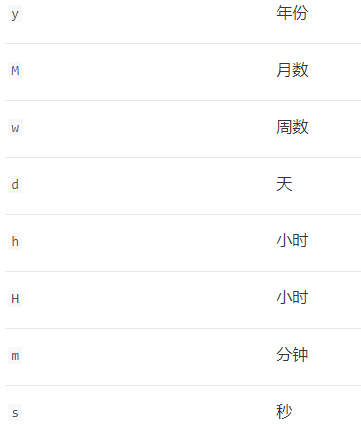
- 如果
now为2001-01-01 12:00:00now+1h表示为2001-01-01 13:00:00
参数
doc_values默认true设置false可以节省空间,但不可以用于排序 聚合 脚本,但可以用于查询format默认strict_date_optional_time||epoch_millis也可以自定义格式yyyy-MM-dd HH:mm:ss||yyyy-MM-ddidnex默认true设置false使此字段不可被检索null_value设置一个值在检索的时候来替换nullstore默认false设置true可以检索只显示true的字段,和_source差不多用于过滤显示hits中_source字段
Flattened
拼合数据类型
应该不被全文检索,因为它的所有值都可作为关键字
在检索期间,所有值都作为字符串进行检索,不需要对数字类型,日期类型进行特殊处理
- 插入数据
1
2
3
4
5
6
7
8
9
10
11
12
13
14
15
16
17
18
19
20
21
22
23
24
25
26PUT bug_reports
{
"mappings": {
"properties": {
"title": {
"type": "text"
},
"labels": {
"type": "flattened"
}
}
}
}
POST bug_reports/_doc/1
{
"title": "Results are not sorted correctly.",
"labels": {
"priority": "urgent",
"release": ["v1.2.5", "v1.3.0"],
"timestamp": {
"created": 1541458026,
"closed": 1541457010
}
}
} - 在整个对象的全部值中查找
"urgent"1
2
3
4
5
6POST bug_reports/_search
{
"query": {
"term": {"labels": "urgent"}
}
} - 如果想查找特定的类型可以使用点符号
1
2
3
4
5
6POST bug_reports/_search
{
"query": {
"term": {"labels.release": "v1.3.0"}
}
}
支持的操作
termtermsterms_setprefixrangematchmulti_matchquery_stringsimple_query_stringexists
查询时无法使用通配符,例如
"labels.time*"
注意,所有查询,包括range操作都将值看做字符串关键字
不支持高度显示
可以对设置flattened的字段进行排序,以及简单聚合,例如terms
与查询一样没有对数字的支持,所有值都为关键字,排序按照字典排序
因为它无法储存内部的映射,所以不可以设置store参数
- 支持的参数
doc_values默认true设置false可以节省空间,但不可以用于排序 聚合 脚本,但可以用于查询ignore_above设置内部字段的长度,用于字符串来设置限定长度,如果大于长度会储存在_source但不可以被检索,聚合index默认true设置false使此字段不可被检索null_value设置一个值在检索的时候来替换null
IP
可以为 IPv4 IPv6地址
支持的参数
doc_values默认true设置false可以节省空间,但不可以用于排序 聚合 脚本,但可以用于查询index默认true设置false使此字段不可被检索null_value设置一个IPv4值在检索的时候来替换nullstore默认false设置true可以检索只显示true的字段,和_source差不多用于过滤显示hits中_source字段
Join
- 添加映射,关系在
relations中定义 - 可以定义单个,也可以定义多个,父只可以有一个,子可以多个
- 每个索引中只可以有一个
join字段
创建映射
a父级b子级
1 | PUT my_index |
添加两个父文档,使用
name来指定父级名称
1 | PUT my_index/_doc/1 |
也可以直接指定,简化版
1 | PUT my_index/_doc/1 |
创建两个子文档,需要指定路由值,其中
name指向子级名称,parent指向父级文档的_id
1 | PUT my_index/_doc/3?routing=1 |
join的限制
- 每个索引只允许有一个
join字段映射 - 父子文档必须在同一分片,这就表示对子文档进行检索,删除,更新需要提供路由值
- 一个字段可以有多个子级,但只可以有一个父级
- 可以向
join中添加新的字段 - 可以将子元素添加到现有的元素中,但该元素需要已经是父级
全部查找,根据
_id排序,默认升序
1 | GET my_index/_search |
父文档查询
- 查找父id为1并且子级名称为
b的文档 - 根据父级名称为
a的文档,显示前十条1
2
3
4
5
6
7
8
9
10
11
12
13
14
15
16
17GET my_index/_search
{
"query": {
"parent_id": {
"type": "b",
"id": "1"
}
},
"aggs": {
"parents": {
"terms": {
"field": "my_join_field#a",
"size": 10
}
}
}
}
全局顺序(global ordinals)
- 如果不经常使用
join并经常插入数据,可以禁用它1
2
3
4
5
6
7
8
9
10
11
12
13
14PUT my_index
{
"mappings": {
"properties": {
"my_join_field": {
"type": "join",
"relations": {
"a": "b"
},
"eager_global_ordinals": false
}
}
}
}
指定多个子级
- 父级
a - 子级
bc1
2
3
4
5
6
7
8
9
10
11
12
13PUT my_index
{
"mappings": {
"properties": {
"my_join_field": {
"type": "join",
"relations": {
"a": ["b", "c"]
}
}
}
}
}
多级别父级,这样设置性能会下降
- 父级
a子级bc - 父级
b子级d1
2
3
4
5
6
7
8
9
10
11
12
13
14PUT my_index
{
"mappings": {
"properties": {
"my_join_field": {
"type": "join",
"relations": {
"a": ["b", "c"],
"b": "d"
}
}
}
}
}
插入子文档
- 这里
name指向子级名称parent指向父级文档的_id也就是父级名称b的_id值1
2
3
4
5
6
7
8PUT my_index/_doc/3?routing=1
{
"text": "I'm d...",
"my_join_field": {
"name": "d",
"parent": "2"
}
}
Keyword
它可以排序,聚合
它只能按准确的值检索,如果想全文检索可以设置为text
1 | PUT my_index |
接收的参数
doc_values默认true设置false可以节省空间,但不可以用于排序 聚合 脚本,但可以用于查询eager_global_ordinals默认false设置true可以在应用刷新时立即加载全局顺序,经常用于聚合的可以开启fields多字段,出于不同目的为同一字符串进行设置,可以一个用于全文检索,一个用于排序,聚合ignore_above设置内部字段的长度,用于字符串来设置限定长度,如果大于长度会储存在_source但不可以被检索,聚合index默认true设置false使此字段不可被检索norms默认设置为false后表示不对其评分,也可以使用PUT对现有字段进行设置norms为false一旦设置为false后就不可再改为truenull_value设置一个值在检索的时候来替换nullstore默认false设置true可以检索只显示true的字段,和_source差不多用于过滤显示hits中_source字段
Nested
nested是object的专用版本,表示对象数组
- 插入数据,默认为
object类型 - 在其内部会转化为
1
2
3
4
5{
"group" : "fans",
"user.first" : [ "alice", "john" ],
"user.last" : [ "smith", "white" ]
}1
2
3
4
5
6
7
8
9
10
11
12
13
14PUT my_index/_doc/1
{
"group" : "fans",
"user" : [
{
"first" : "John",
"last" : "Smith"
},
{
"first" : "Alice",
"last" : "White"
}
]
} - 所以同时搜索
AliceandSmith也可以搜索到1
2
3
4
5
6
7
8
9
10
11GET my_index/_search
{
"query": {
"bool": {
"must": [
{ "match": { "user.first": "Alice" }},
{ "match": { "user.last": "Smith" }}
]
}
}
}设置
nested映射,插入数据1
2
3
4
5
6
7
8
9
10
11
12
13
14
15
16
17
18
19
20
21
22
23
24
25PUT my_index
{
"mappings": {
"properties": {
"user": {
"type": "nested"
}
}
}
}
PUT my_index/_doc/1
{
"group" : "fans",
"user" : [
{
"first" : "John",
"last" : "Smith"
},
{
"first" : "Alice",
"last" : "White"
}
]
} - 这时如果同时检索
AliceandSmith就匹配不到文档了,因为没有一个文档是user.first=Alice amd user.last=Smith - 这里是
path执行查询的nested类型的字段名称1
2
3
4
5
6
7
8
9
10
11
12
13
14
15
16GET my_index/_search
{
"query": {
"nested": {
"path": "user",
"query": {
"bool": {
"must": [
{ "match": { "user.first": "Alice" }},
{ "match": { "user.last": "Smith" }}
]
}
}
}
}
} - 查询在类型
nested的字段名称user,并且user.first=Alice amd user.last=White的文档 - 并且高亮显示匹配到的
user.first1
2
3
4
5
6
7
8
9
10
11
12
13
14
15
16
17
18
19
20
21
22
23GET my_index/_search
{
"query": {
"nested": {
"path": "user",
"query": {
"bool": {
"must": [
{ "match": { "user.first": "Alice" }},
{ "match": { "user.last": "White" }}
]
}
},
"inner_hits": {
"highlight": {
"fields": {
"user.first": {}
}
}
}
}
}
}
字段参数
dynamic默认true没有指定properties时是否支持动态映射,为false可以添加到_source但不会创建映射也不会被检索,为strict会插入新字段异常properties嵌套对象可以是任何数据类型,可以将新属性添加到现有对象中
nested映射的上限值
index.mapping.nested_fields.limit默认值50index.mapping.nested_objects.limit默认值10000
Numeric
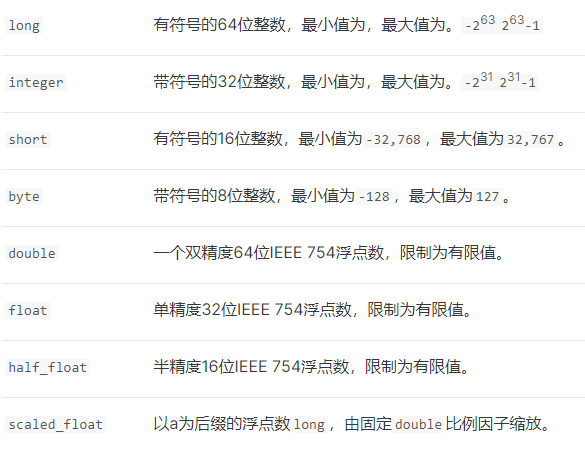
类型的选取
- 如果没有小数根据自己的大小范围选择
byteshortintegerlong - 如果有精度根据需求选择
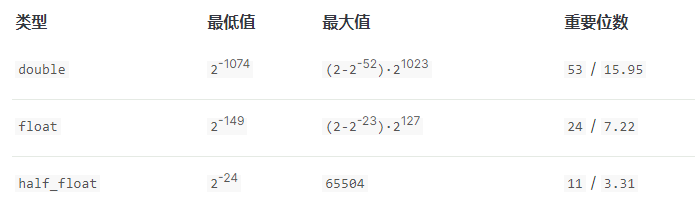
注意
doublefloathalf_float类型会考虑+0.0与-0.0的区别- 使用
term查询-0.0不会匹配到+0.0反之亦然 - 如果上限是
-0.0不会匹配+0.0 - 如果下限是
+0.0不会匹配-0.0
接受参数
coerce默认true将字符串转为数字,并截取整数部分(小数点前面部分)doc_values默认true设置false可以节省空间,但不可以用于排序 聚合 脚本,但可以用于查询ignore_malformed默认false格式错误发生异常 为true则插入数据在_source但不创建映射,不能用于检索index默认true设置false使此字段不可被检索null_value设置一个值在检索的时候来替换nullstore默认false设置true可以检索只显示true的字段,和_source差不多用于过滤显示hits中_source字段
Object
JSON文档可以嵌套对象,对象可以再嵌套对象
- 这里整个JSON文档是一个
Object - JSON文档里面包含了一个
manager的Object manager里面再包含了一个name的Object1
2
3
4
5
6
7
8
9
10
11PUT my_index/_doc/1
{
"region": "US",
"manager": {
"age": 30,
"name": {
"first": "John",
"last": "Smith"
}
}
}- 其内部构造
1
2
3
4
5
6{
"region": "US",
"manager.age": 30,
"manager.name.first": "John",
"manager.name.last": "Smith"
}
创建映射,不需要设置
type因为object是默认值
- 这里表示最外层的文档是一个
Object - 文档内部包含了一个
manager的Object manager里面再包含了一个name的Object1
2
3
4
5
6
7
8
9
10
11
12
13
14
15
16
17
18
19
20
21PUT my_index
{
"mappings": {
"properties": {
"region": {
"type": "keyword"
},
"manager": {
"properties": {
"age": { "type": "integer" },
"name": {
"properties": {
"first": { "type": "text" },
"last": { "type": "text" }
}
}
}
}
}
}
}
接受参数
dynamic默认true没有指定properties时是否支持动态映射,为false可以添加到_source但不会创建映射也不会被检索,为strict会插入新字段异常enabled默认true为false时可以以任何类型添加数据,数据都会被储存在_source中,但不会创建映射,也不能被检索properties嵌套对象可以是任何数据类型,可以将新属性添加到现有对象中
Range
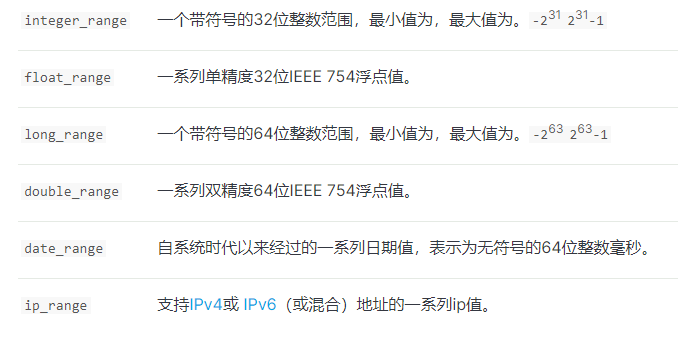
创建映射
1 | PUT range_index |
添加文档,日期格式可以为
format的一种
- 日期也可以使用
now表示系统时间
也可以使用日期数学
+1h-1d/d1
2
3
4
5
6
7
8
9
10
11PUT range_index/_doc/1
{
"expected_attendees" : {
"gte" : 10,
"lte" : 20
},
"time_frame" : {
"gte" : "2015-10-31 12:00:00",
"lte" : "2015-11-01"
}
}
数组范围查询文档
1 | GET range_index/_search |
日期范围查询文档
WITHIN搜索范围包含文档范围,可以相等CONTAINS文档范围包含搜索范围,可以相等INTERSECTS默认 搜索范围和文档范围有相交部分,包括相等1
2
3
4
5
6
7
8
9
10
11
12GET range_index/_search
{
"query" : {
"range" : {
"time_frame" : {
"gte" : "2015-10-31",
"lte" : "2015-11-01",
"relation" : "WITHIN"
}
}
}
}
接受参数
coerce默认true将字符串转为数字,并截取整数部分(小数点前面部分)index默认true设置false使此字段不可被检索store默认false设置true可以检索只显示true的字段,和_source差不多用于过滤显示hits中_source字段
Text
文本数据类型
- 同一字段最好包括
text文本和keyword关键字这样可以text全文检索,而keyword用于排序,聚合
添加映射
1 | PUT my_index |
接受字段
analyzer默认standard指定分词器,使用ik分词器ik_max_wordeager_global_ordinals默认false设置true可以在应用刷新时立即加载全局顺序,经常用于聚合的可以开启fielddata默认false设置字段是否可用于排序,聚合,脚本fields多字段,出于不同目的为同一字符串进行设置,可以一个用于全文检索,一个用于排序,聚合index默认true设置false使此字段不可被检索norms默认设置为false后表示不对其评分,也可以使用PUT对现有字段进行设置norms为false一旦设置为false后就不可再改为truestore默认false设置true可以检索只显示true的字段,和_source差不多用于过滤显示hits中_source字段
Token count
令牌计数
创建映射,插入文档
1 | PUT my_index |
检索文档
- “Rachel Alice Williams”会被当做
RachelAliceWilliams三个令牌 - 查找令牌数为3的文档,仅匹配文档2,如果改为2 则仅匹配文档1
1
2
3
4
5
6
7
8GET my_index/_search
{
"query": {
"term": {
"name.length": 3
}
}
}
接受参数
analyzer默认standard指定分词器,使用ik分词器ik_max_worddoc_values默认true设置false可以节省空间,但不可以用于排序 聚合 脚本,但可以用于查询index默认true设置false使此字段不可被检索null_value设置一个值在检索的时候来替换nullstore默认false设置true可以检索只显示true的字段,和_source差不多用于过滤显示hits中_source字段
查询DSL
复合查询
boolmustshould与相关性分数有关must_notfilter与相关性分数无关,表示过滤
boostingpositive表示匹配的文档 减少相关性分数negative
constant_score- 查询的文档
_score都是常量
- 查询的文档
dis_max- 接受多个查询,并返回满足任意一个的文档,当配合
bool使用时,将使用匹配的最佳文档
- 接受多个查询,并返回满足任意一个的文档,当配合
bool
must都满足,相关性_score提高must_not都不满足,相关性_score为0should满足任何一个filter都满足,但是相关性_score全部一致1
2
3
4
5
6
7
8
9
10
11
12
13
14
15
16
17
18
19
20
21
22GET _search
{
"query": {
"bool" : {
"must" : {
"term" : { "user" : "kimchy" }
},
"filter": {
"term" : { "tag" : "tech" }
},
"must_not" : {
"range" : {
"age" : { "gte" : 10, "lte" : 20 }
}
},
"should" : [
{ "term" : { "tag" : "wow" } },
{ "term" : { "tag" : "elasticsearch" } }
]
}
}
}
boosting
positive必须,返回的文档需要与此匹配negative必须,降低匹配文档相关性negative_boost必须,值介于0,1.0之间浮点数,得分与之相乘1
2
3
4
5
6
7
8
9
10
11
12
13
14
15
16
17
18GET /_search
{
"query": {
"boosting" : {
"positive" : {
"term" : {
"text" : "apple"
}
},
"negative" : {
"term" : {
"text" : "pie tart fruit crumble tree"
}
},
"negative_boost" : 0.5
}
}
}
constant_score
filter必须,过滤文档,不考虑相关性分数1
2
3
4
5
6
7
8
9
10GET /_search
{
"query": {
"constant_score" : {
"filter" : {
"term" : { "user" : "kimchy"}
}
}
}
}
dis_max
- 返回一条相关性分数最高的文档
queries必须,包含一个或多个条件,满足条件越多,相关性分数越高tie_breaker表示[0,1.0]浮点数,与相关性分数相乘1
2
3
4
5
6
7
8
9
10
11
12GET /_search
{
"query": {
"dis_max" : {
"queries" : [
{ "term" : { "title" : "Quick pets" }},
{ "term" : { "body" : "Quick pets" }}
],
"tie_breaker" : 0.7
}
}
}
全文查询
intervals
- 下面检索字段
my_text
1)、可以匹配my favorite food is cold porridge
2)、不可以匹配when it's cold my favorite food is porridge1
2
3
4
5
6
7
8
9
10
11
12
13
14
15
16
17
18
19
20
21
22
23
24
25
26
27
28
29POST _search
{
"query": {
"intervals" : {
"my_text" : {
"all_of" : {
"ordered" : true,
"intervals" : [
{
"match" : {
"query" : "my favorite food",
"max_gaps" : 0,
"ordered" : true
}
},
{
"any_of" : {
"intervals" : [
{ "match" : { "query" : "hot water" } },
{ "match" : { "query" : "cold porridge" } }
]
}
}
]
}
}
}
}
}
match
可以全文查询也可以模糊查询
- 也可以使用
analyzer指定分词器 - 简单查询
1
2
3
4
5
6
7
8GET /_search
{
"query": {
"match" : {
"message" : "this is a test"
}
}
} operatorand默认为or1
2
3
4
5
6
7
8
9
10
11GET /_search
{
"query": {
"match" : {
"message" : {
"query" : "this is a test",
"operator" : "and"
}
}
}
}
match_bool_prefix
- 下面两者相等,匹配前缀表示
quick* or brown* or f*1
2
3
4
5
6
7
8
9
10
11
12
13
14
15
16
17
18
19
20
21GET /_search
{
"query": {
"match_bool_prefix" : {
"message" : "quick brown f"
}
}
}
GET /_search
{
"query": {
"bool" : {
"should": [
{ "term": { "message": "quick" }},
{ "term": { "message": "brown" }},
{ "prefix": { "message": "f"}}
]
}
}
}
match_phrase
- 短语匹配,可指定分词器
1
2
3
4
5
6
7
8
9
10
11GET /_search
{
"query": {
"match_phrase" : {
"message" : {
"query" : "this is a test",
"analyzer" : "ik_max_word"
}
}
}
}
match_phrase_prefix
短语匹配前缀,也可以添加参数
analyzer来指定分词器只能匹配到前缀,例如
- “how”
- 可以匹配
how are youhow old are youwhat how - 不可以匹配
whow are youwhathow you因为这些不是how开头
- 可以匹配
h- 可以匹配
how arewhat here - 不可以匹配
elasticsearchmatch因为这些不是h开头
- 可以匹配
- “how”
下面可以匹配
quick brown foxtwo quick brown ferrets不可以匹配
the fox is quick and brown1
2
3
4
5
6
7
8
9
10GET /_search
{
"query": {
"match_phrase_prefix" : {
"message" : {
"query" : "quick brown f"
}
}
}
}
multi_match
可以匹配多字段查询
- 表示在
subjectormessage中查询this is a test1
2
3
4
5
6
7
8
9GET /_search
{
"query": {
"multi_match" : {
"query": "this is a test",
"fields": [ "subject", "message" ]
}
}
} - 使用通配符* 表示零个或多个
- 可以匹配
titlefirst_namelast_name1
2
3
4
5
6
7
8
9GET /_search
{
"query": {
"multi_match" : {
"query": "Will Smith",
"fields": [ "title", "*_name" ]
}
}
} - 里面可以有
analyzer来指定分词器 type可以指定查询类型best_fields1
2
3
4
5
6
7
8
9
10
11
12
13
14
15
16
17
18
19
20
21
22
23
24GET /_search
{
"query": {
"multi_match" : {
"query": "brown fox",
"type": "best_fields",
"fields": [ "subject", "message" ],
"tie_breaker": 0.3
}
}
}
GET /_search
{
"query": {
"dis_max": {
"queries": [
{ "match": { "subject": "brown fox" }},
{ "match": { "message": "brown fox" }}
],
"tie_breaker": 0.3
}
}
}operatorand- 所有术语都存在
1
2
3
4
5
6
7
8
9
10
11GET /_search
{
"query": {
"multi_match" : {
"query": "Will Smith",
"type": "best_fields",
"fields": [ "first_name", "last_name" ],
"operator": "and"
}
}
} most_fields1
2
3
4
5
6
7
8
9
10
11
12
13
14
15
16
17
18
19
20
21
22
23GET /_search
{
"query": {
"multi_match" : {
"query": "quick brown fox",
"type": "most_fields",
"fields": [ "title", "title.original", "title.shingles" ]
}
}
}
GET /_search
{
"query": {
"bool": {
"should": [
{ "match": { "title": "quick brown fox" }},
{ "match": { "title.original": "quick brown fox" }},
{ "match": { "title.shingles": "quick brown fox" }}
]
}
}
}phrase_prefix1
2
3
4
5
6
7
8
9
10
11
12
13
14
15
16
17
18
19
20
21
22GET /_search
{
"query": {
"multi_match" : {
"query": "quick brown f",
"type": "phrase_prefix",
"fields": [ "subject", "message" ]
}
}
}
GET /_search
{
"query": {
"dis_max": {
"queries": [
{ "match_phrase_prefix": { "subject": "quick brown f" }},
{ "match_phrase_prefix": { "message": "quick brown f" }}
]
}
}
}minimum_should_match1
2
3
4
5
6
7
8
9
10
11
12
13
14
15
16
17
18
19
20
21
22
23
24
25
26
27
28
29
30
31
32
33
34
35
36
37
38
39
40
41可以指定分词的个数,
1 -> 匹配任意一个词
2 -> 匹配任意两个词
3 -> 因为超过了分词量,所以匹配不到
GET a1/_search
{
"query": {
"match": {
"name": {
"query": "小米电视",
"minimum_should_match": 1
}
}
}
}
3x0.66=1.98,因为1.98<2 所以匹配任意一个
GET a1/_search
{
"query": {
"match": {
"name": {
"query": "小米智能电视",
"minimum_should_match": "66%"
}
}
}
}
3x0.67=2.01,因为2.01>2 所以匹配任意两个
GET a1/_search
{
"query": {
"match": {
"name": {
"query": "小米智能电视",
"minimum_should_match": "67%"
}
}
}
}cross_fields- 至少匹配一个
WillorSmith1
2
3
4
5
6
7
8
9
10
11GET /_search
{
"query": {
"multi_match" : {
"query": "Will Smith",
"type": "cross_fields",
"fields": [ "first_name", "last_name" ],
"operator": "and"
}
}
} bool_prefix【与match_bool_prefix相似】1
2
3
4
5
6
7
8
9
10GET /_search
{
"query": {
"multi_match" : {
"query": "quick brown f",
"type": "bool_prefix",
"fields": [ "subject", "message" ]
}
}
}
query_string
1 | GET /_search |
status:activestatus字段包含active
title:(quick OR brown)title字段包含quick或brown
author:"John Smith"- 包含短语
John Smith
- 包含短语
book.\*:(quick OR brown)- 星号*需要使用反斜杠进行转义,可以匹配
book.titlebook.content
- 星号*需要使用反斜杠进行转义,可以匹配
_exists_:titletitle非空
- 通配符
- ?代表一个 *代表零个或多个
- 使用*可以匹配
""" "但不可以匹配null
- 空格 空查询
- 如果是
""或" "他将不返回文档
- 如果是
- 下面可以匹配必须含有
a不能含有d的所有值,再此前提再多出bc会提高相关性得分 - 相当于
((a AND b) OR (a AND c) OR a) AND NOT d1
2
3
4
5
6
7{
"bool": {
"must": { "match": "a" },
"should": { "match": "b c" },
"must_not": { "match": "d" }
}
}
连接查询
nested
单个查询
- 添加字段
a为nested类型1
2
3
4
5
6
7
8
9
10PUT my_index
{
"mappings" : {
"properties" : {
"a" : {
"type" : "nested"
}
}
}
} - 检索文档
path对应nested类型文档的名称a.b表示a字段下的b属性score_modeavg默认,匹配子对象的平均相关性得分min匹配子对象的最小相关性得分max匹配子对象的最大相关性得分none不使用匹配子对象的相关性分数,设置父文档相关性分数0sum匹配子对象的相关性得分相加
ignore_unmapped- 默认
false为true表示指定path错误也不会报异常,结果为空1
2
3
4
5
6
7
8
9
10
11
12
13
14
15
16
17GET /my_index/_search
{
"query": {
"nested" : {
"path" : "a",
"query" : {
"bool" : {
"must" : [
{ "match" : {"a.b" : "blue"} },
{ "range" : {"a.c" : {"gt" : 5}} }
]
}
},
"score_mode" : "avg"
}
}
}
- 默认
嵌套查询
- 创建映射,添加文档
1
2
3
4
5
6
7
8
9
10
11
12
13
14
15
16
17
18
19
20
21
22
23
24
25
26
27
28
29
30
31
32
33
34
35
36
37
38
39
40
41
42
43
44
45
46
47
48
49
50
51
52
53
54
55
56
57
58
59
60PUT /drivers
{
"mappings" : {
"properties" : {
"driver" : {
"type" : "nested",
"properties" : {
"last_name" : {
"type" : "text"
},
"vehicle" : {
"type" : "nested",
"properties" : {
"make" : {
"type" : "text"
},
"model" : {
"type" : "text"
}
}
}
}
}
}
}
}
PUT /drivers/_doc/1
{
"driver" : {
"last_name" : "McQueen",
"vehicle" : [
{
"make" : "Powell Motors",
"model" : "Canyonero"
},
{
"make" : "Miller-Meteor",
"model" : "Ecto-1"
}
]
}
}
PUT /drivers/_doc/2
{
"driver" : {
"last_name" : "Hudson",
"vehicle" : [
{
"make" : "Mifune",
"model" : "Mach Five"
},
{
"make" : "Miller-Meteor",
"model" : "Ecto-1"
}
]
}
} - 嵌套
nested检索1
2
3
4
5
6
7
8
9
10
11
12
13
14
15
16
17
18
19
20
21GET /drivers/_search
{
"query" : {
"nested" : {
"path" : "driver",
"query" : {
"nested" : {
"path" : "driver.vehicle",
"query" : {
"bool" : {
"must" : [
{ "match" : { "driver.vehicle.make" : "Powell Motors" } },
{ "match" : { "driver.vehicle.model" : "Canyonero" } }
]
}
}
}
}
}
}
}
has_child
- 创建映射
a父级b子级1
2
3
4
5
6
7
8
9
10
11
12
13PUT /my_index
{
"mappings": {
"properties" : {
"my-join-field" : {
"type" : "join",
"relations": {
"a": "b"
}
}
}
}
}- 检索
type必须为子级文档的字段名称query查询条件ignore_unmapped默认false为true表示指定type错误也不会报异常max_children查询的父文档,子级最大数min_children查询的父文档,子级最小数score_modenone默认不使用匹配子文档的相关性分数,设置父文档相关性分数0avg匹配子文档的平均相关性得分min匹配子文档的最小相关性得分max匹配子文档对的最大相关性得分sum匹配子文档的相关性得分相加1
2
3
4
5
6
7
8
9
10
11
12
13
14GET my_index/_search
{
"query": {
"has_child" : {
"type" : "child",
"query" : {
"match_all" : {}
},
"max_children": 10,
"min_children": 2,
"score_mode" : "min"
}
}
}
has_parent
- 创建映射
1
2
3
4
5
6
7
8
9
10
11
12
13
14
15
16PUT /my-index
{
"mappings": {
"properties" : {
"my-join-field" : {
"type" : "join",
"relations": {
"a": "b"
}
},
"tag" : {
"type" : "keyword"
}
}
}
} - 检索文档
1
2
3
4
5
6
7
8
9
10
11
12
13
14
15GET /my-index/_search
{
"query": {
"has_parent" : {
"parent_type" : "a",
"query" : {
"term" : {
"tag" : {
"value" : "Elasticsearch"
}
}
}
}
}
}
parent_id
- 创建映射
a父级b子级1
2
3
4
5
6
7
8
9
10
11
12
13PUT my_index
{
"mappings": {
"properties" : {
"my-join-field" : {
"type" : "join",
"relations": {
"a": "b"
}
}
}
}
}- 添加父文档
1
2
3
4
5POST /my_index/_doc/1
{
"text": "I'm a...",
"my-join-field": "a"
} - 添加子文档
- 路由值也必须指定
name子文档字段名称parent对应父文档的_id1
2
3
4
5
6
7
8POST /my_index/_doc/2?routing=1
{
"text": "I'm b...",
"my-join-field": {
"name": "b",
"parent": "1"
}
}parent_id检索文档type为子级文档字段名称id为关联父级文档_idignore_unmapped默认false为true表示指定type错误也不会报异常1
2
3
4
5
6
7
8
9GET my_index/_search
{
"query": {
"parent_id": {
"type": "b",
"id": "1"
}
}
}
match_all
- 查询所有文档,相关性分数1.0
1
2
3
4
5
6GET mm/_search
{
"query": {
"match_all": {}
}
} - 设置相关性分数2.0
1
2
3
4
5
6
7
8GET mm/_search
{
"query": {
"match_all": {
"boost": 2
}
}
} - 简写版
1
2
3
4GET mm/_search
GET mm/_search
{} - 全部不匹配
1
2
3
4
5
6GET mm/_search
{
"query": {
"match_none": {}
}
}
词语标准查询
exists
查找不到的原因
- 字段是
null或[] - 字段设置不可被检索
"index":false - 字段长度超出
ignore_above限制 - 字段格式错误,设置了
"ignore_malformed":true1
2
3
4
5
6
7
8GET /_search
{
"query": {
"exists": {
"field": "user"
}
}
}
可以匹配到
- 空字符串
""" "或”-“ - 数组中包含
null和一个不为null的值,例如[null,"111"] - 设置了
null_value的字段,即使为null也可以被检索到
使用
must_not查找相反
1 | GET /_search |
fuzzy
模糊查询
- 更改一个字符
box -> fox - 删除一个字符
black -> lack - 插入一个字符
sic -> sick - 转换两个相邻字符位置
act -> cat1
2
3
4
5
6
7
8
9
10GET /_search
{
"query": {
"fuzzy": {
"user": {
"value": "ki"
}
}
}
}
ids
按照文档的
_id值返回满足的文档
1 | GET /_search |
prefix
前缀查询
- 查找字段
user以ki开头的词语1
2
3
4
5
6
7
8
9
10GET /_search
{
"query": {
"prefix": {
"user": {
"value": "ki"
}
}
}
}
简化版
1 | GET /_search |
range
范围查询,所用参数
lt>lte>=gt<gte<=format字段为date类型时,指定日期格式,检索时,覆盖映射格式relationINTERSECTS默认 搜索范围和文档范围有相交部分,包括相等CONTAINS文档范围包含搜索范围,可以相等WITHIN搜索范围包含文档范围,可以相等
time_zone不会转化now但会转化日期数学now-1hboost默认1.0 指定相关性分数1
2
3
4
5
6
7
8
9
10
11
12
13
14
15
16
17
18
19
20
21
22
23
24GET _search
{
"query": {
"range" : {
"age" : {
"gte" : 10,
"lte" : 20,
"boost" : 2.0
}
}
}
}
GET _search
{
"query": {
"range" : {
"timestamp" : {
"gte" : "now-1d/d",
"lt" : "now/d"
}
}
}
}
regexp
正则查询
参考正则表达式教程
1 | GET /_search |
term
精确查询,不应该使用对
text字段使用,对于text应该用match
1 | GET /_search |
为什么不能使用
term对text类型进行检索
例如:Quick Brown Foxes!会被解析为[quick, brown, fox]
这是在通过term精确检索Quick Brown Foxes!就会找不到…
terms
与
term相同,只不过terms是查询多个值
1 | GET /_search |
创建索引,插入文档
1 | PUT my_index |
- 在索引
my_index中检索与索引my_index且文档ID为2与字段color相同词语的文档 - 如果在创建索引时指定了路由值,则必须设置
routing参数1
2
3
4
5
6
7
8
9
10
11
12GET my_index/_search
{
"query": {
"terms": {
"color" : {
"index" : "my_index",
"id" : "2",
"path" : "color"
}
}
}
}
wildcard
通配符查询,不适用中文
?匹配任何单个字母*匹配0个或多个字母- 下面查询
ki*y可以匹配kiykitykimchy1
2
3
4
5
6
7
8
9
10GET /_search
{
"query": {
"wildcard": {
"user": {
"value": "ki*y"
}
}
}
}
聚合
度量聚合
avg
平均值聚合
1 | GET /exams/_search?size=0 |
结果
1 | { |
extended_stats
扩展统计聚合
1 | GET /exams/_search |
结果
1 | { |
max
最大值聚合
1 | POST /sales/_search?size=0 |
结果
1 | { |
min
最小值聚合
1 | POST /sales/_search?size=0 |
结果
1 | { |
stats
统计聚合
1 | POST /exams/_search?size=0 |
结果
1 | { |
sum
1 | POST /sales/_search?size=0 |
结果
1 | { |
value_count
共多少个值
- 如果文档1{“a”:”a”} 文档2{“a”:[“a”,”aa”,” “,””,null]}
- 共有5个值
例如:结果1
2
3
4
5
6POST /sales/_search?size=0
{
"aggs" : {
"types_count" : { "value_count" : { "field" : "type" } }
}
}1
2
3
4
5
6
7
8{
...
"aggregations": {
"types_count": {
"value": 7
}
}
}
桶聚合
- 度量聚合是嵌套桶聚合里面的
adjacency_matrix
相邻矩阵聚合
1 | PUT /emails/_bulk |
结果
- 按照
filters的自定义名称grpAgrpBgrpC进行表示key1
2
3
4
5
6
7
8
9
10
11
12
13
14
15
16
17
18
19
20
21
22
23
24
25
26
27
28...
"aggregations" : {
"interactions" : {
"buckets" : [
{
"key" : "grpA",
"doc_count" : 2
},
{
"key" : "grpA&grpB",
"doc_count" : 1
},
{
"key" : "grpB",
"doc_count" : 2
},
{
"key" : "grpB&grpC",
"doc_count" : 1
},
{
"key" : "grpC",
"doc_count" : 1
}
]
}
}
}
children
子级聚合
- 创建映射
a父级b子级,添加文档1
2
3
4
5
6
7
8
9
10
11
12
13
14
15
16
17
18
19
20
21
22
23
24
25
26
27
28
29
30
31
32
33
34
35
36
37
38
39
40
41
42
43PUT child_example
{
"mappings": {
"properties": {
"my_join": {
"type": "join",
"relations": {
"a": "b"
}
}
}
}
}
PUT child_example/_doc/1
{
"my_join": "a",
"tags": [
"windows-server-2003",
"windows-server-2008",
"file-transfer"
]
}
PUT child_example/_doc/2?routing=1
{
"my_join": {
"name": "b",
"parent": "1"
},
"owner": {
"display_name": "Sam"
}
}
PUT child_example/_doc/3?routing=1
{
"my_join": {
"name": "b",
"parent": "1"
},
"owner": {
"display_name": "Troll"
}
} - 聚合文档结果
1
2
3
4
5
6
7
8
9
10
11
12
13
14
15
16
17
18
19
20
21
22
23
24
25
26GET child_example/_search?size=0
{
"aggs": {
"top-tags": {
"terms": {
"field": "tags.keyword",
"size": 10
},
"aggs": {
"to-answers": {
"children": {
"type" : "b"
},
"aggs": {
"top-names": {
"terms": {
"field": "owner.display_name.keyword",
"size": 10
}
}
}
}
}
}
}
}1
2
3
4
5
6
7
8
9
10
11
12
13
14
15
16
17
18
19
20
21
22
23
24
25
26
27
28...
"aggregations" : {
"top-tags" : {
"doc_count_error_upper_bound" : 0,
"sum_other_doc_count" : 0,
"buckets" : [
{
"key" : "file-transfer",
"doc_count" : 1,
"to-answers" : {
"doc_count" : 2,
"top-names" : {
"doc_count_error_upper_bound" : 0,
"sum_other_doc_count" : 0,
"buckets" : [
{
"key" : "Sam",
"doc_count" : 1
},
{
"key" : "Troll",
"doc_count" : 1
}
]
}
}
},
...
composite
复合聚合
1 | POST xll/_bulk |
结果
1 | ... |
date_histogram
日期间隔聚合
calendar_interval日历间隔minute m 1mhour h 1hday d 1dweek w 1wmonth M 1Mquarter q 1qyear y 1y
fixed_interval固定间隔,不能用小数1.5h可以用90m代替milliseconds ms,seconds sminutes mhours hdays d
- 插入数据,聚合文档结果
1
2
3
4
5
6
7
8
9
10
11
12
13
14
15
16
17
18
19
20
21
22
23
24
25
26
27
28
29
30
31
32PUT /cars/_bulk
{ "index": {}}
{ "price" : 10000, "color" : "red", "make" : "honda", "sold" : "2014-10-28" }
{ "index": {}}
{ "price" : 20000, "color" : "red", "make" : "honda", "sold" : "2014-11-05" }
{ "index": {}}
{ "price" : 30000, "color" : "green", "make" : "ford", "sold" : "2014-05-18" }
{ "index": {}}
{ "price" : 15000, "color" : "blue", "make" : "toyota", "sold" : "2014-07-02" }
{ "index": {}}
{ "price" : 12000, "color" : "green", "make" : "toyota", "sold" : "2014-08-19" }
{ "index": {}}
{ "price" : 20000, "color" : "red", "make" : "honda", "sold" : "2014-11-05" }
{ "index": {}}
{ "price" : 80000, "color" : "red", "make" : "bmw", "sold" : "2014-01-01" }
{ "index": {}}
{ "price" : 25000, "color" : "blue", "make" : "ford", "sold" : "2014-02-01" }
GET cars/_search
{
"size": 0,
"aggs": {
"x": {
"date_histogram": {
"field": "sold",
"calendar_interval": "month",
"format": "yyyy-MM-dd",
"min_doc_count": 1
}
}
}
} "key_as_string" : "2014-01-01",包括2014-01-01,不包含2014-02-011
2
3
4
5
6
7
8
9
10
11
12
13
14
15...
"aggregations" : {
"x" : {
"buckets" : [
{
"key_as_string" : "2014-01-01",
"key" : 1388534400000,
"doc_count" : 1
},
{
"key_as_string" : "2014-02-01",
"key" : 1391212800000,
"doc_count" : 1
},
...- 使用
extended_bounds扩展日期,来计算全年的情况结果1
2
3
4
5
6
7
8
9
10
11
12
13
14
15
16
17GET cars/_search
{
"size": 0,
"aggs": {
"x": {
"date_histogram": {
"field": "sold",
"calendar_interval": "month",
"format": "yyyy-MM-dd",
"extended_bounds": {
"min": "2014-01-01",
"max": "2014-12-31"
}
}
}
}
}1
2
3
4
5
6
7
8
9
10
11
12
13
14
15
16
17
18
19
20
21
22
23
24
25
26
27
28
29
30
31
32
33
34
35
36
37
38
39
40
41
42
43
44
45
46
47
48
49
50
51
52
53
54
55
56
57
58
59
60
61
62
63
64
65
66
67
68...
"aggregations" : {
"x" : {
"buckets" : [
{
"key_as_string" : "2014-01-01",
"key" : 1388534400000,
"doc_count" : 1
},
{
"key_as_string" : "2014-02-01",
"key" : 1391212800000,
"doc_count" : 1
},
{
"key_as_string" : "2014-03-01",
"key" : 1393632000000,
"doc_count" : 0
},
{
"key_as_string" : "2014-04-01",
"key" : 1396310400000,
"doc_count" : 0
},
{
"key_as_string" : "2014-05-01",
"key" : 1398902400000,
"doc_count" : 1
},
{
"key_as_string" : "2014-06-01",
"key" : 1401580800000,
"doc_count" : 0
},
{
"key_as_string" : "2014-07-01",
"key" : 1404172800000,
"doc_count" : 1
},
{
"key_as_string" : "2014-08-01",
"key" : 1406851200000,
"doc_count" : 1
},
{
"key_as_string" : "2014-09-01",
"key" : 1409529600000,
"doc_count" : 0
},
{
"key_as_string" : "2014-10-01",
"key" : 1412121600000,
"doc_count" : 1
},
{
"key_as_string" : "2014-11-01",
"key" : 1414800000000,
"doc_count" : 2
},
{
"key_as_string" : "2014-12-01",
"key" : 1417392000000,
"doc_count" : 0
}
]
}
}
}
间隔固定30天
1 | GET cars/_search |
结果
1 | ... |
filter
过滤聚合,只影响聚合不影响检索
1 | GET cars/_search |
结果
1 | ... |
filters
过滤聚合
- 插入文档,聚合文档结果
1
2
3
4
5
6
7
8
9
10
11
12
13
14
15
16
17
18
19
20
21
22
23
24PUT /logs/_bulk
{ "index" : { "_id" : 1 } }
{ "body" : "warning: page could not be rendered" }
{ "index" : { "_id" : 2 } }
{ "body" : "authentication error" }
{ "index" : { "_id" : 3 } }
{ "body" : "warning: connection timed out" }
{ "index" : { "_id" : 4 } }
{ "body": "info: user Bob logged out" }
GET logs/_search
{
"size": 0,
"aggs": {
"x": {
"filters": {
"filters": {
"error":{"match":{"body":"error"}},
"warning":{"match":{"body":"warning"}}
}
}
}
}
}1
2
3
4
5
6
7
8
9
10
11
12
13
14...
"aggregations" : {
"x" : {
"buckets" : {
"error" : {
"doc_count" : 1
},
"warning" : {
"doc_count" : 2
}
}
}
}
}
匿名filters聚合
1 | GET logs/_search |
结果
1 | ... |
其他桶
"other_bucket": true默认桶名称_other_"other_bucket_key": "oooo"自定义桶名称,指定了这个可以省略other_bucket结果1
2
3
4
5
6
7
8
9
10
11
12
13
14
15GET logs/_search
{
"size": 0,
"aggs": {
"x": {
"filters": {
"filters": {
"error":{"match":{"body":"error"}},
"warning":{"match":{"body":"warning"}}
},
"other_bucket_key": "oooo"
}
}
}
}1
2
3
4
5
6
7
8
9
10
11
12
13
14
15
16
17...
"aggregations" : {
"x" : {
"buckets" : {
"error" : {
"doc_count" : 1
},
"warning" : {
"doc_count" : 2
},
"oooo" : {
"doc_count" : 1
}
}
}
}
}
global
全局聚合,对其他桶无关
avg_price计算所有产品的平均价格t_shirts计算所有T恤价格结果1
2
3
4
5
6
7
8
9
10
11
12
13
14
15POST /sales/_search?size=0
{
"query" : {
"match" : { "type" : "t-shirt" }
},
"aggs" : {
"all_products" : {
"global" : {},
"aggs" : {
"avg_price" : { "avg" : { "field" : "price" } }
}
},
"t_shirts": { "avg" : { "field" : "price" } }
}
}1
2
3
4
5
6
7
8
9
10
11
12
13
14{
...
"aggregations" : {
"all_products" : {
"doc_count" : 7,
"avg_price" : {
"value" : 140.71428571428572
}
},
"t_shirts": {
"value" : 128.33333333333334
}
}
}
histogram
数值间隔聚合
1 | POST /sales/_search?size=0 |
结果
1 | { |
最小文档数
1 | POST /sales/_search?size=0 |
结果
1 | { |
扩展范围
1 | POST /sales/_search?size=0 |
missing
缺失聚合
- 字段值为
null - 字段值为
[] - 字段长度超出
ignore_above限制 - 字段格式错误,设置了
"ignore_malformed":true结果,可以再嵌套聚合查询桶内的1
2
3
4
5
6
7
8
9
10
11GET abv/_search
{
"size": 0,
"aggs": {
"x": {
"missing": {
"field": "a.keyword"
}
}
}
}_id1
2
3
4
5
6
7...
"aggregations" : {
"x" : {
"doc_count" : 2
}
}
}
nested
嵌套聚合
- 创建映射,插入文档,聚合文档结果
1
2
3
4
5
6
7
8
9
10
11
12
13
14
15
16
17
18
19
20
21
22
23
24
25
26
27
28
29
30
31
32
33
34
35
36
37
38
39
40
41
42
43
44
45
46PUT /products
{
"mappings": {
"properties" : {
"resellers" : {
"type" : "nested",
"properties" : {
"reseller" : { "type" : "text" },
"price" : { "type" : "double" }
}
}
}
}
}
PUT /products/_doc/0
{
"name": "LED TV",
"resellers": [
{
"reseller": "companyA",
"price": 350
},
{
"reseller": "companyB",
"price": 500
}
]
}
GET /products/_search
{
"query" : {
"match" : { "name" : "led tv" }
},
"aggs" : {
"x" : {
"nested" : {
"path" : "resellers"
},
"aggs" : {
"min_price" : { "min" : { "field" : "resellers.price" } }
}
}
}
}1
2
3
4
5
6
7
8
9
10...
"aggregations" : {
"x" : {
"doc_count" : 2,
"min_price" : {
"value" : 350.0
}
}
}
}
parent
父级聚合
- 创建映射,插入文档,聚合文档结果
1
2
3
4
5
6
7
8
9
10
11
12
13
14
15
16
17
18
19
20
21
22
23
24
25
26
27
28
29
30
31
32
33
34
35
36
37
38
39
40
41
42
43
44
45
46
47
48
49
50
51
52
53
54
55
56
57
58
59
60
61
62
63
64
65
66
67
68
69
70
71
72
73
74PUT parent_example
{
"mappings": {
"properties": {
"join": {
"type": "join",
"relations": {
"a": "b"
}
}
}
}
}
PUT parent_example/_doc/1
{
"join": {
"name": "a"
},
"tags": [
"windows-server-2003",
"windows-server-2008",
"file-transfer"
]
}
PUT parent_example/_doc/2?routing=1
{
"join": {
"name": "b",
"parent": "1"
},
"owner": {
"display_name": "Sam"
}
}
PUT parent_example/_doc/3?routing=1&refresh
{
"join": {
"name": "b",
"parent": "1"
},
"owner": {
"display_name": "Troll"
}
}
POST parent_example/_search?size=0
{
"aggs": {
"top-names": {
"terms": {
"field": "owner.display_name.keyword",
"size": 10
},
"aggs": {
"to-questions": {
"parent": {
"type" : "b"
},
"aggs": {
"top-tags": {
"terms": {
"field": "tags.keyword",
"size": 10
}
}
}
}
}
}
}
}1
2
3
4
5
6
7
8
9
10
11
12
13
14
15
16
17
18
19
20
21
22
23
24
25
26
27
28
29
30
31
32
33
34
35
36
37
38
39
40...
"aggregations" : {
"top-names" : {
"doc_count_error_upper_bound" : 0,
"sum_other_doc_count" : 0,
"buckets" : [
{
"key" : "Sam",
"doc_count" : 1,
"to-questions" : {
"doc_count" : 1,
"top-tags" : {
"doc_count_error_upper_bound" : 0,
"sum_other_doc_count" : 0,
"buckets" : [
{
"key" : "file-transfer",
"doc_count" : 1
},
{
"key" : "windows-server-2003",
"doc_count" : 1
},
{
"key" : "windows-server-2008",
"doc_count" : 1
}
]
}
}
},
{
"key" : "Troll",
"doc_count" : 1,
...
}
]
}
}
}
range
范围聚合
- 创建文档,聚合文档
{"to": 102}表示[最小值,102){"from": 102,"to":104}表示[102,104){"from": 104}表示[104,最大值]结果1
2
3
4
5
6
7
8
9
10
11
12
13
14
15
16
17
18
19
20
21
22
23
24
25
26
27
28
29
30PUT bnm/_bulk
{"index":{"_id":1}}
{"a":101}
{"index":{"_id":2}}
{"a":102}
{"index":{"_id":3}}
{"a":103}
{"index":{"_id":4}}
{"a":104}
{"index":{"_id":5}}
{"a":105}
{"index":{"_id":6}}
{"a":106}
GET bnm/_search
{
"size": 0,
"aggs": {
"x": {
"range": {
"field": "a",
"ranges": [
{"to": 102},
{"from": 102,"to":104},
{"from": 104}
]
}
}
}
}1
2
3
4
5
6
7
8
9
10
11
12
13
14
15
16
17
18
19
20
21
22
23"aggregations" : {
"x" : {
"buckets" : [
{
"key" : "*-102.0",
"to" : 102.0,
"doc_count" : 1
},
{
"key" : "102.0-104.0",
"from" : 102.0,
"to" : 104.0,
"doc_count" : 2
},
{
"key" : "104.0-*",
"from" : 104.0,
"doc_count" : 3
}
]
}
}
}
自定义每个范围名称名称
1 | GET bnm/_search |
结果
1 | ... |
terms
分组
field需要分组的字段"field":"a"min_doc_count匹配最小文档数"min_doc_count":1order排序,根据桶的key降序,也可以使用_count代表文档数"order": {"_key": "desc"}size要显示的记录数"size":3exclude要排除的值,例如排除key为102的值"exclude": ["102"]include只包含哪些值,例如只包含key为102的值"include": ["102"]
聚合文档
- a2>a3.variance 表示”a2”中的”a3”的”variance”属性
- 按照价格两万一次分割,过滤了只取”red”,”green”一共6个文档,并且根据分割块进行价格计算扩展统计,
- 根据分割每一块的扩展统计的方差来升序排列,并且排除分割内至少数量为1
- 这里”a1”//单值桶 “a2”//多值桶 “a3”//度量指标结果
1
2
3
4
5
6
7
8
9
10
11
12
13
14
15
16
17
18
19
20
21
22
23
24
25
26GET cars/_search
{
"size": 0,
"aggs": {
"a1": {
"histogram": {
"field": "price",
"interval": 20000,
"min_doc_count": 1,
"order": {"a2>a3.variance": "asc"}
},
"aggs": {
"a2": {
"filter": {
"terms": {"color": ["red","green"]}
},
"aggs": {
"a3": {
"extended_stats": {"field": "price"}
}
}
}
}
}
}
}1
2
3
4
5
6
7
8
9
10
11
12
13
14
15
16
17
18
19
20
21
22
23
24
25...
"aggregations": {
"a1": {//多值桶
"buckets": [
{
"key": 80000,//[80000,100000)有1条
"doc_count": 1,
"a2": {//单值桶
"doc_count": 1,//[80000,100000) 并且属于["red","green"]有1条
"a3": {
"count": 1,
"min": 80000,
"max": 80000,
"avg": 80000,
"sum": 80000,
"sum_of_squares": 6400000000,
"variance": 0,//属于["red","green"]1条的方差
"std_deviation": 0,
"std_deviation_bounds": {
"upper": 80000,
"lower": 80000
}
}
}
},...
管道聚合
avg_bucket
桶平均值
- 插入文档
1
2
3
4
5
6
7
8
9
10
11PUT gg/_bulk
{"index":{"_id":1}}
{"x":"x1","y":11}
{"index":{"_id":2}}
{"x":"x2","y":22}
{"index":{"_id":3}}
{"x":"x1","y":33}
{"index":{"_id":4}}
{"x":"x3","y":44}
{"index":{"_id":5}}
{"x":"x2","y":55} - 聚合文档
- 计算分组的sum值的平均值结果
1
2
3
4
5
6
7
8
9
10
11
12
13
14
15
16
17
18
19
20
21
22
23GET gg/_search
{
"size": 0,
"aggs": {
"f1": {
"terms": {
"field": "x.keyword" // 按照x进行分组
},
"aggs": {
"f11": {
"sum": {
"field": "y" // 对x分组进行y求sum和
}
}
}
},
"f2":{
"avg_bucket": {
"buckets_path": "f1>f11" // 对f1 中的f11,进行求平均值
}
}
}
}1
2
3
4
5
6
7
8
9
10
11
12
13
14
15
16
17
18
19
20
21
22
23
24
25
26
27
28
29
30
31
32
33"aggregations" : {
"f1" : {
"doc_count_error_upper_bound" : 0,
"sum_other_doc_count" : 0,
"buckets" : [
{
"key" : "x1",
"doc_count" : 2,
"f11" : {
"value" : 44.0
}
},
{
"key" : "x2",
"doc_count" : 2,
"f11" : {
"value" : 77.0
}
},
{
"key" : "x3",
"doc_count" : 1,
"f11" : {
"value" : 44.0
}
}
]
},
"f2" : {
"value" : 55.0
}
}
}
derivative
桶衍生
- 插入文档
1
2
3
4
5
6
7
8
9
10
11PUT gg/_bulk
{"index":{"_id":1}}
{"x":"2019-01-05","y":11}
{"index":{"_id":2}}
{"x":"2019-02-15","y":22}
{"index":{"_id":3}}
{"x":"2019-01-05","y":33}
{"index":{"_id":4}}
{"x":"2019-03-18","y":44}
{"index":{"_id":5}}
{"x":"2019-03-27","y":55} - 一阶衍生
f12为当前f11减去上一个f11- 第一个不会显示
f12因为它没有上一个结果1
2
3
4
5
6
7
8
9
10
11
12
13
14
15
16
17
18
19
20
21
22GET gg/_search
{
"size": 0,
"aggs": {
"f1": {
"date_histogram": {
"field": "x",
"calendar_interval":"month",
"min_doc_count": 1,
"format": "yyyy-MM-dd"
},
"aggs": {
"f11": {
"sum": {"field": "y"}
},
"f12":{
"derivative": {"buckets_path": "f11"} // 相比上个月 f11的变化,增加 减少了多少
}
}
}
}
}1
2
3
4
5
6
7
8
9
10
11
12
13
14
15
16
17
18
19
20
21
22
23
24
25
26
27
28
29
30
31
32
33
34
35
36
37"aggregations" : {
"f1" : {
"buckets" : [
{
"key_as_string" : "2019-01-01",
"key" : 1546300800000,
"doc_count" : 2,
"f11" : {
"value" : 44.0
}
},
{
"key_as_string" : "2019-02-01",
"key" : 1548979200000,
"doc_count" : 1,
"f11" : {
"value" : 22.0
},
"f12" : {
"value" : -22.0 // 相比上个月 f11减少了22.0
}
},
{
"key_as_string" : "2019-03-01",
"key" : 1551398400000,
"doc_count" : 2,
"f11" : {
"value" : 99.0
},
"f12" : {
"value" : 77.0 // 相比上个月 f11增加了77.0
}
}
]
}
}
} - 二阶衍生
f12为当前f11减去上一个f11f13为当前f12减去上一个f12- 第一个不会显示
f12因为它没有上一个 - 第一个 第二个都不会显示
f13因为它们都没有上一个结果1
2
3
4
5
6
7
8
9
10
11
12
13
14
15
16
17
18
19
20
21
22
23
24
25GET gg/_search
{
"size": 0,
"aggs": {
"f1": {
"date_histogram": {
"field": "x",
"calendar_interval":"month",
"min_doc_count": 1,
"format": "yyyy-MM-dd"
},
"aggs": {
"f11": {
"sum": {"field": "y"}
},
"f12":{
"derivative": {"buckets_path": "f11"}
},
"f13":{
"derivative": {"buckets_path": "f12"}
}
}
}
}
}1
2
3
4
5
6
7
8
9
10
11
12
13
14
15
16
17
18
19
20
21
22
23
24
25
26
27
28
29
30
31
32
33
34
35
36
37
38
39
40"aggregations" : {
"f1" : {
"buckets" : [
{
"key_as_string" : "2019-01-01",
"key" : 1546300800000,
"doc_count" : 2,
"f11" : {
"value" : 44.0
}
},
{
"key_as_string" : "2019-02-01",
"key" : 1548979200000,
"doc_count" : 1,
"f11" : {
"value" : 22.0
},
"f12" : {
"value" : -22.0
}
},
{
"key_as_string" : "2019-03-01",
"key" : 1551398400000,
"doc_count" : 2,
"f11" : {
"value" : 99.0
},
"f12" : {
"value" : 77.0
},
"f13" : {
"value" : 99.0
}
}
]
}
}
} - 给一阶衍生的
f12加一个属性normalized_value - 设置
"unit": "day"-> 当前的normalized_value表示当前的f12除以当前的key_as_string减去上一个key_as_string的天数结果1
2
3
4
5
6
7
8
9
10
11
12
13
14
15
16
17
18
19
20
21
22
23
24
25GET gg/_search
{
"size": 0,
"aggs": {
"f1": {
"date_histogram": {
"field": "x",
"calendar_interval":"month",
"min_doc_count": 1,
"format": "yyyy-MM-dd"
},
"aggs": {
"f11": {
"sum": {"field": "y"}
},
"f12":{
"derivative": {
"buckets_path": "f11", // f11除以上一个的天数,平均每天的变化
"unit": "day"
}
}
}
}
}
}1
2
3
4
5
6
7
8
9
10
11
12
13
14
15
16
17
18
19
20
21
22
23
24
25
26
27
28
29
30
31
32
33
34
35
36
37
38
39"aggregations" : {
"f1" : {
"buckets" : [
{
"key_as_string" : "2019-01-01",
"key" : 1546300800000,
"doc_count" : 2,
"f11" : {
"value" : 44.0
}
},
{
"key_as_string" : "2019-02-01",
"key" : 1548979200000,
"doc_count" : 1,
"f11" : {
"value" : 22.0
},
"f12" : {
"value" : -22.0,
"normalized_value" : -0.7096774193548387 // -22/31 31上一个的天数
}
},
{
"key_as_string" : "2019-03-01",
"key" : 1551398400000,
"doc_count" : 2,
"f11" : {
"value" : 99.0
},
"f12" : {
"value" : 77.0,
"normalized_value" : 2.75 // 77/28 28上个月的天数
}
}
]
}
}
}
max_bucket
桶最大值
1 | GET gg/_search |
结果
1 | "aggregations" : { |
min_bucket
桶最小值
1 | GET gg/_search |
结果
1 | "aggregations" : { |
sum_bucket
桶求和
1 | GET gg/_search |
结果
1 | "aggregations" : { |
stats_bucket
桶统计
1 | GET gg/_search |
结果
1 | "aggregations" : { |
extended_stats_bucket
桶扩展统计
1 | GET gg/_search |
结果
1 | "aggregations" : { |
cumulative_sum
桶累加
1 | GET gg/_search |
结果
1 | "aggregations" : { |
cumulative_cardinality
桶累加基数
1 | GET gg/_search |
结果
1 | "aggregations" : { |
bucket_sort
桶排序
1 | GET gg/_search |
结果
1 | ... |
- 不排序,只对数据进行截断结果
1
2
3
4
5
6
7
8
9
10
11
12
13
14
15
16
17
18
19
20
21
22
23
24
25
26GET gg/_search
{
"size": 0,
"aggs": {
"f1": {
"date_histogram": {
"field": "x",
"calendar_interval":"month",
"min_doc_count": 1,
"format": "yyyy-MM-dd"
},
"aggs": {
"f11": {
"sum": {"field": "y"}
},
"f12":{
// 跳过第一条,再得到两条记录。也就是得到第2,3条记录。
"bucket_sort": {
"from": 1,
"size": 2
}
}
}
}
}
}1
2
3
4
5
6
7
8
9
10
11
12
13
14
15
16
17
18
19
20
21
22
23"aggregations" : {
"f1" : {
"buckets" : [
{
"key_as_string" : "2019-02-01",
"key" : 1548979200000,
"doc_count" : 1,
"f11" : {
"value" : 22.0
}
},
{
"key_as_string" : "2019-03-01",
"key" : 1551398400000,
"doc_count" : 2,
"f11" : {
"value" : 99.0
}
}
]
}
}
}